Showing posts with label SOA 12c. Show all posts

Tuesday, 16 February 2016

Oracle Enterprise Scheduler -ESS - Quick Scheduling the SOA/BPEL service


Hello Folks,

Yet another new feature in Oracle SOA Suite 12C is Oracle Enterprise scheduler Service (ESS). ESS is also part of MFT (Brand new feature to utilize utmost file transfer functionality in SOA 12C-Managed File Transfer- Will discuss in my next blog).

We used to have lot of challenges while scheduling any service. Third party vendors created many tools for scheduling s service (To get this functionality adopted) but some vendors could achieve this some people end up with no result, It’s good that Oracle added this in this new release, which is very useful in middleware space.

ESS features in middleware:
Schedule periodic notifications for faulted instances.
Schedule any job without manual triggering.
Long running services.
Immediate triggering in the background.
Run once at future time or at recurring schedule.

ESS Demo: Quick service scheduling.
To schedule any service there are two parts of it.
1         Define the job to be scheduled.
2     Submit he job based on the required time intervals.

Here we will see how to schedule a simple SOA service/WS. 
Below is the Home page of ESS.


 Open ESS App page, Drop down the Scheduling service group.

Go to Job MetadataàJob Definitions.

Click on NEW to Create/Define new schedule.
                                      
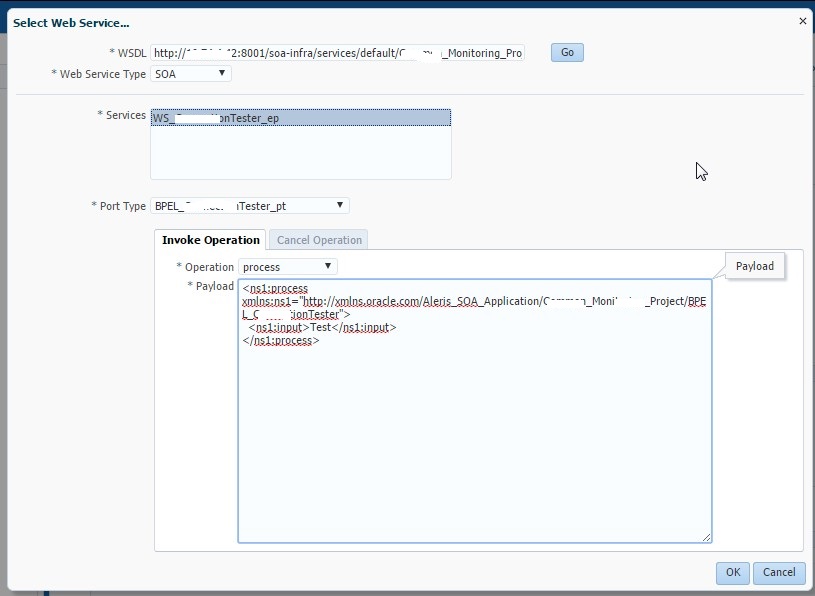
Enter the names and package name, Job Type (Based on the service you can select this type of a job). Click on the Select Web Service

Enter the valid WSDL, which need to be defined /scheduled.
Select the type of the web service.

Once you select SOA as a Web Service Type- You will see coming service and port type. Select appropriate port type of this service. You will have opened extended popup to give the input payload. You can give the payload to test.    
               
Give the payload and say OK.

Now the Job has been defined. You need to submit the schedule next.

Now the job definition is completed. Its time to Submit the job defined.

Drop down Scheduling Service GroupàJob RequestsàSubmit Job Requests.

Enter the submission notes to track the job details among different jobs.
Enter the Job definition name and then search. 

Upon selecting the defined job we can see the service section filled with job metadata.

In the schedule part we can see three parts of it.
1 ONCE:  Once is the one time job submission (You can select the job time-date-year)

2 Use existing schedule- If you already created schedules then we just browse the schedule and select it. 


3 Specify schedule: This one is to schedule the job with multi frequency, based on time zone with start date. Can save this schedule to use it in second part again when needed.

Once this is done we can see the job is submitted.

In actions drop down part, we can see the request log, submitted composite flow trace and other features to modify the properties.

Upon successful job submission the job schedule page will be showing the status and count and other statistics.


That’s it for ESS. This is the most simple and very useful feature in SOA 12C.

Happy Learning...!!!!!!!!!!!! Fun Sharing.........!!!!!!!!!

Friday, 19 September 2014

Oracle Fusion Middleware – SOA 12 c – At a glance


Hi Folks,

Here you go the new exciting Oracle Fusion Middleware - SOA 12 c.

Oracle recently made its long awaited & long-anticipated version with more productivity, performance, sophisticated & easy-to-use version.

New Additions in SOA 12c

 Integration of OSB development
I am very happy to see that JDeveloper IDE is enough to develop both SOA & OSB.
In 12 C both SB and SCA development is done JDeveloper . For SB the analogy of SCA has been used by remaining a ‘Proxy’ to ‘Proxy Service’ (‘Exposed services ‘ in an SCA composite) and a ‘Business Service ’ to external references (same as in SCA composite) and visually show them as swim lanes in JDeveloper.

Anyways when you are developing  a pipeline, nothing has changed- same interface when you were developing OSB 11g. 


New Technology Adapters in SOA 12c.

1.     Cloud Integration -The major that happened in SOA 12c Cloud integration
2.     Mobile ennoblement– In support of REST & JSON.
3.     JD Edwards Integration.
4.     SAP Integration.
5.     Oracle Coherence Adapter – Definitely it will be a big add-on to SOA 12c and it allows seamless integration with local/remote coherence cache in support of different operations.
6.     Oracle Event Processing (OEP) -OEP provides an open architecture for sourcing, processing, and publishing complex events through the enterprise.
7.     MSMQ Adapter - MSMQ is the messaging middleware from Microsoft, running on the Windows operating system. This allows you to send And receive messages from private, public queues and Distributed Lists.
8.     LDAP Adapter- It provides bi-directional integration with several LDAP V3 directory servers and enables users to perform real-time query, CRUD, compare, search and also issue DSML requests to the server.
9.     UMS Adapter – It provides bidirectional support of email communication and extended to messaging channel such as SMS & IM.
10.  MFT Adapter – The key feature that added as an advantage like file exchanging & management to internal and external partners  but its altogether different product in Oracle Fusion Middleware 12 c (Additional licensing is required – Marketing tip J)
 Debugger Integration
  New debugger feature added in debug design time issues.


The exciting feature is here. Now you can run the services in Debug mode .You can now set breakpoints in Composite editor, BPEL processes and Service Bus Pipelines, which gives you the ability to stop at a break point, look at the data and step in, step out, etc, just as any ‘normal’ programming language in an IDE. In a BPEL process, you’re also able to change the value of a variable while debugging.
 Enterprise Manager Enhancements
1. One unified UI to see end to end composites and it has multiple domains like SOA Infra & Service Bus
2. Can optimize work managers
3. Error Hospital for Enterprise fault handling management.
4. Security management for EM console.
5. Modularity by SOA_foundation profile Profiles arranged in decreasing order footprint to reduce the overall footprint of the SOA infrastructure. Reduce overall class loading and overall startup time of the server 

·                     SOA CLASSIC ~ SOA Foundation with B2B + BPM Modules
·                     SOA FOUNDATION WITH HEALTHCARE ~ SOA Foundation with B2B + Healthcare UI
·                     SOA FOUNDATION WITH B2B ~ SOA Foundation Enterprise + B2B
·                     SOA FOUNDATION ENTERPRISE ~ SOA Foundation + Full Adapter Set
·                     SOA FOUNDATION ~ Orchestration + Mediator + Rules + Partial Adapter set
·                     ORCHESTRATION ~ BPEL-Only + HWF + Partial Adapter set
·                     BPEL-ONLY  ~ BPEL Components + SOA Common Infrastructure + Partial Adapter set
 Monitoring & Diagnostics
Oracle Enterprise Monitor is improved in 12 c a lot, now it provides diagnosability reporting for all adapter binding components for SOA applications. This will provide real-time visibility into availability and message exchange statistics with all adapters. 
Management Improvements
A very new excited features added as part of this release – This time oracle made easy our operations and management in OEM.
SOA dashboard changes below.

Here are the some new Key configuration, SOA Runtime Health and System Backlogs, Business Transaction Faults, Search, Fault Alerts.
Performance Improvement
Composite Lazy Loading 
 Lazy loading is a staggered loading of a composite artifacts which spreads out bootstrap cost.
This approach delays the loading of some resources (Schemas, WSDL, XSLTs, etc) till it receives its first time request. With this the initial time for server startup is improved and the cost across for individual composites is spread out based on their demand. It reduces overhead from composites which are rarely used and retired composites.

There are 4 stages in loading artifacts.
1.       Creation on in-memory java models
2.       Creating Mbeans
3.       Loading the various components in the composite
4.       Loading the resources used by the composites such as schemas & WSDLs

The first two stages are performed at server startup, which is more of loading the metadata that would be needed. When a particular composite receives a request, then it performs the next two stages, that is composite starts initializing and loading its resources and initiates and doing the same for dependent composites.


Here you go for path of CompositeLazyLaoding in EM à Right click on soa_infra –System MBean Browser – SoaInfraConfig – soa-infraattributes.


Miscellaneous

 1. MDS extended to OSB but the limitation is you can retrieve the artifacts from MDS but you can’t publish them to MDS. (Off course we have alternate procedure).  
 2. MQ adapter to integrate with IBM Websphere MQ .
 3. SOA 12c now supports XQuery & XSLT for BPEL – never before.
 4. Fault Policy Editor GUI added as an advantage to develop enterprise fault handling framework.
 5. ESS Enterprise Scheduler Service( Scheduled Activation and Deactivation) – This is very useful addition in SOA 12 c it supports new Enterprise Scheduler service to be restricted the services to certain timings in a day.
 6. Cross platform support – All adapters will be supported within SOA  Suite, Service bus, BPM projects.
  

Many more to go .....in my next blog...


Happy Learning...!!!!!!!!!!!! Fun Sharing.........!!!!!!!!!


Monday, 4 August 2014

Oracle SOA Suite 12 C Installation - Step by Step

Hi Folks,

Finally Oracle recently made its long awaited & long-anticipated version with more productivity, performance, sophisticated & easy-to-use version.

Here you go :- 

I would like to share the installation process of most awaited  Oracle SOA suite 12 c.

I have installed this in Windows 7 machine.This time Oracle made the installation procedure pretty easy.
Make sure you have downloaded the SOA software binaries.I have mentioned below.
Make sure you have installed latest JDK and supported DB.

You will get fmw_12.1.3.0.soaqa_Disk1_1of1.zip and unzip the folder then you will get the following JAR files to install.


There are 3 steps for the entire installation

1. Weblogic n etc installtion.
2. RCU installation.
3. Extend domain.

Now follow the installation procedure.

1. Unzip the installer and start the installation procedure.
2. This will open up welcome screen of SOA 12 c installation.
 3. Click Next and Set you Oracle Home location of your drive.
4. Click Next for prerequisites.
5. Click Next. Check the installation summary and click Install.
6.Click Finish.


Done.. !! We are done with the Weblogic installtion n etc.
Now time ti install RCU.

RCU Installation

We have to install RCU schemas before domain creation.  In earlier release everything is separate installer but in SOA 12 c everything is packed into one installer.

Goto $FMW_Home/Oracle_Common/bin/rcu.bat   and run as Administrator to bring up the RCU welcome screen.
1. Click Next and choose default options to proceed.
2. Click Next and fill your DB information with credentials as you already installed the DB earlier.
3. Click Next and ignore the warning related to XE as you would be using this for DEVELOPMENT.
4. It will check some prerequisites and click OK . Enter prefix and select  SOA Infrastructure schema this will select all the dependent schemas.
5. Enter prefix and click Next.
6. Click Next and let the default values same.
7. Click Next and enter Password for all the schemas.


7. Confirm the RCU creation by clicking OK. Click Create.
8. Click Finish to compete the RCU creation.

We are done with RCU creation and go with domain creation.

Domain creation

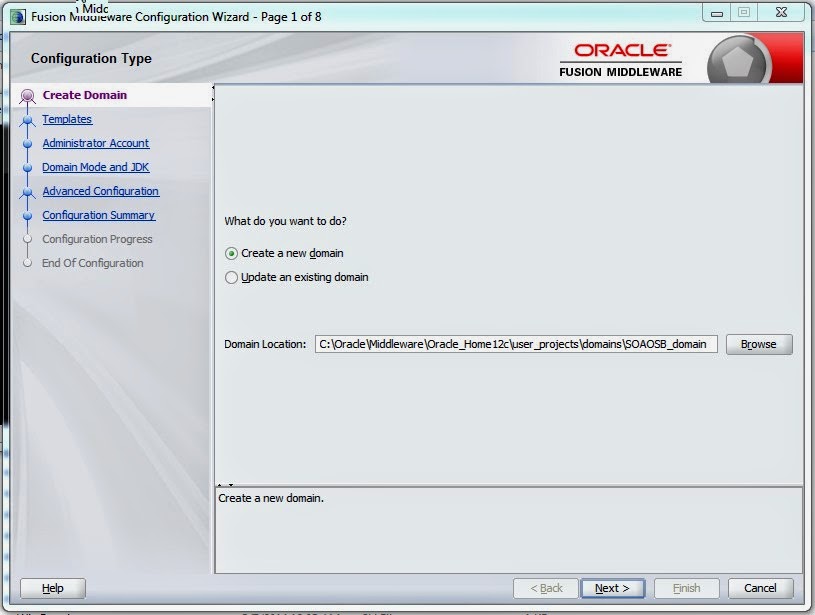
Locate the file  $FMW_Home/Oracle_Common/common/bin/config.cmd and run as Administrator to bring up domain creation screen.

1. Give domain name and click Next. 
2. Select the FMW products which you want to install and click Next.
3. Click next and accept defaults.
4. Give credentials and click Next.
5. Choose domain mode (Dev/Prod) and accept defaults or change the JDK location.
6. Enter STB schema information and click on Get RCU Information if it is success click Next.
7. Click Next.
8. Test the connection details which are provided.
9. Click Next and verify the connection success for all the schemas. If not go back to connection details and give individual schema connection information.
10. Keep the defaults and continue by clicking Next. 
11. Click Create to start the domain creation.
12. Click Next .

13. Note down the server URLs and Finish for completion and also you can start the admin server here itself for the first time.

We are done with the installation of Prestigious Oracle SOA Suite 12 c installation . :-) 


Happy Learning...!!!!!!!!!!!! Fun Sharing.........!!!!!!!!!